 Echolot
gRPC
Call gRPC services described by a .proto file or by the server's reflection, with messages written and shown as JSON.
A gRPC request calls one method of a service. You write the message as JSON; Echolot encodes it with the service's description, sends it over HTTP/2, and shows the answer as JSON with the call's status.
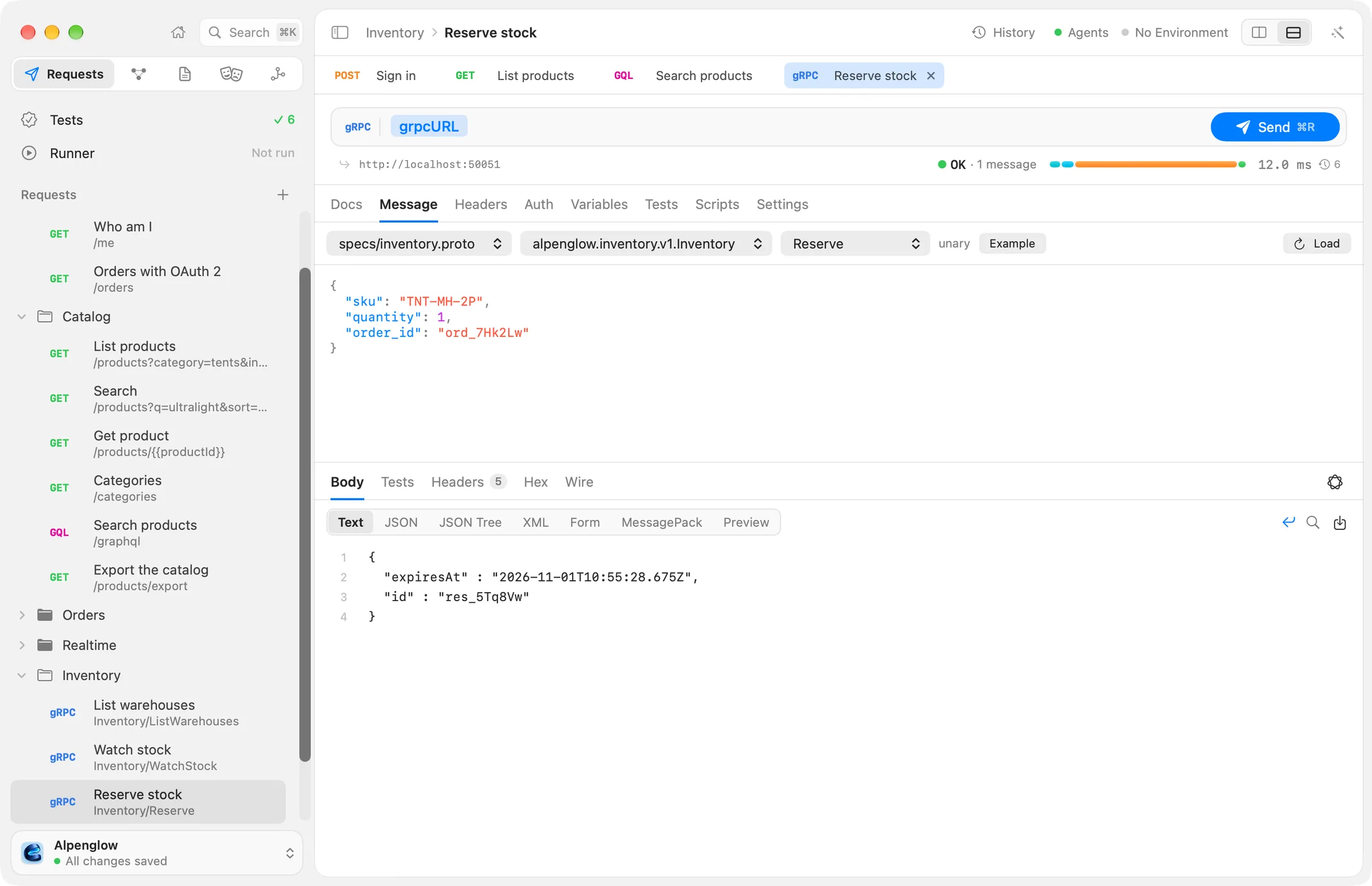
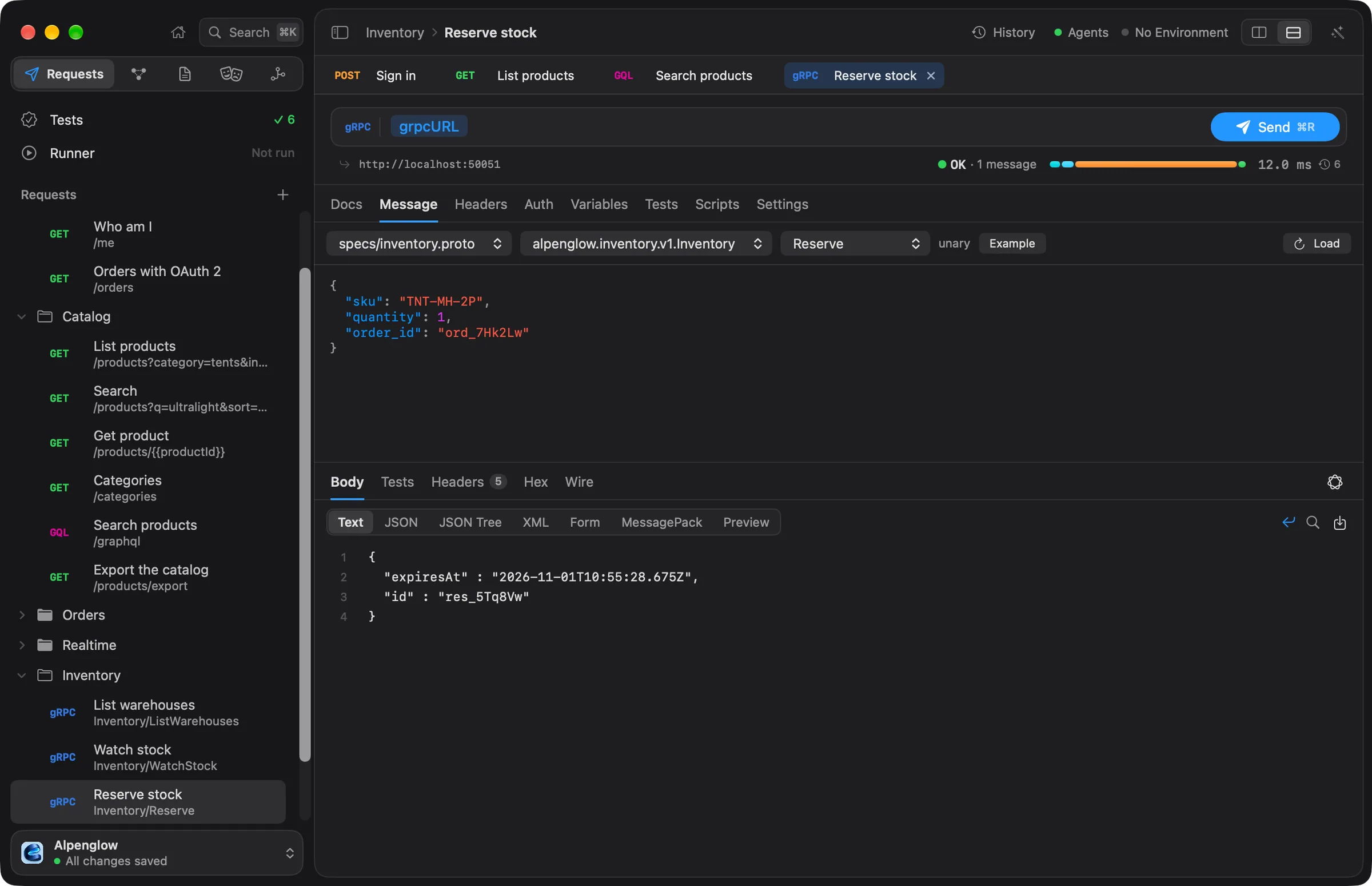
Try it with Alpenglow
The Inventory folder's requests call a gRPC server on localhost:50051. It is in the docs repository's
examples/servers folder (bun run grpc).
Create a gRPC request
Choose File › New gRPC Request, or New gRPC Request from the + menu beside Requests in the sidebar.
The address is the server, such as http://localhost:50051 ({{grpcURL}} in Alpenglow), without a path.
The editor has these tabs: Docs, Message, Headers, Auth, Variables, Tests, Scripts and Settings. The headers are the call's metadata. gRPC calls are always POST, so the badge reads gRPC instead of a method.
Describe the service
The Message tab starts with where the services are described:
- A
.protofile in the workspace'sspecs/folder, such asspecs/inventory.proto. Its imports are read from beside it, and the well-knowngoogle.protobuftypes need no file. You add and edit.protofiles on the Specs page: see proto files. - Server reflection: Echolot asks the server for its services. The server has to offer the reflection service. The reflection call goes to the request's address with its headers, auth and variables.
Choose Load to read the services. Then pick the service and the method. Beside the method, Echolot shows its kind: unary, server streaming, client streaming or bidirectional streaming.
Starting from a .proto file on the Specs page is quicker: its outline lists every method, each with a button that
makes a gRPC request for it with an example message.
Write the message
The message is JSON, in protobuf's JSON mapping, with {{variables}}:
{
  "sku": "TNT-MH-2P",
  "quantity": 1,
  "order_id": "{{orderId}}"
}
Example replaces the message with every field of the method's input at an example value, nested messages included, to start from.
In the JSON mapping, 64-bit integers are strings, bytes are Base64, enums are their names, maps are objects, and
Timestamp, Duration, FieldMask, the wrappers, Struct and Any have their usual JSON forms. A key the message
type doesn't have is refused, so a typo doesn't go unnoticed.
Call kinds
| Kind | The message you write | The response |
|---|---|---|
| Unary | One JSON object | One JSON object |
| Server streaming | One JSON object | A JSON array of every message the server sent |
| Client streaming | A JSON array of messages | One JSON object |
| Bidirectional streaming | A JSON array of messages | A JSON array of every message the server sent |
For Inventory › Watch stock, a server-streaming call, the message names the products to watch and the response is the list of stock levels the server sent.
Status, metadata and trailers
gRPC reports how a call went in its status, which arrives in the trailers after the messages. The response summary
shows it: OK in green, or the status and its code in red, such as NOT_FOUND (5), with the number of messages
received and their compression. The response's Headers tab shows the response headers.
To check the status in tests, add a gRPC status check in the Tests tab: it equals OK by default, and takes
names (NOT_FOUND) or codes (5). See scripts and tests.
Compression and deadline
The gRPC badge before the address is a menu:
- Compress messages: None, gzip or deflate. Compressed replies are always read, whatever this says.
- Deadline: No deadline, or 500 ms, 1 s, 5 s or 30 s. The deadline goes to the server, and a call that runs
past it ends with
DEADLINE_EXCEEDED.
TLS and certificates
An http:// address calls the server over HTTP/2 without TLS. An https:// address uses TLS, with the workspace's
certificate rules, so custom CA certificates and client certificates work. See
request settings.
From the command line
echolot grpc describe lists a server's services and methods, and echolot grpc call makes a call and exits with 1
on a status other than OK. See echolot grpc.