 Echolot
Tutorials
Step-by-step lessons against the Alpenglow demo shop, from your first request to agents and CI.
Each tutorial takes one job from start to finish. They all use Alpenglow, a pretend outdoor-gear shop: the
demo API on https://demo.echolot.dev, and an example workspace that already holds a
request of every kind. You need Echolot on a Mac with macOS 15 or later and Apple silicon. Nothing you send to the demo
is stored.
The Alpenglow workspace
Most tutorials either build their own workspace or start from Alpenglow. To get it:
- Download Alpenglow.echolot.zip.
- Double-click the zip in the Finder to unzip it. You get
Alpenglow.echolot. - Double-click
Alpenglow.echolot. Echolot opens it in a workspace window. You can also choose File › Open Workspace… (⌘O) and pick it.
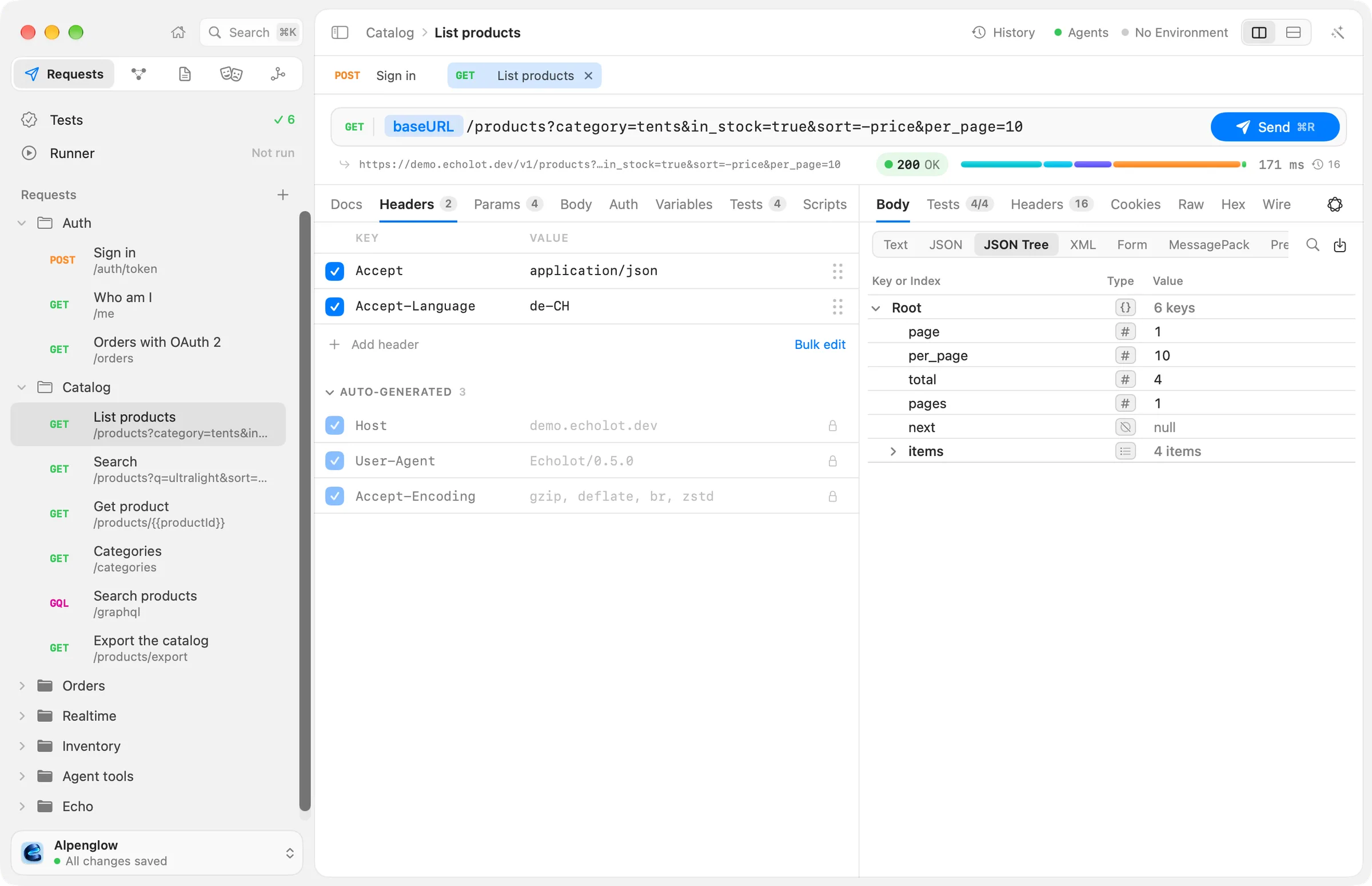
Alpenglow works with No Environment chosen: its workspace variables point at the demo API. It holds:
| Folder | What is in it |
|---|---|
| Auth | Sign in, which stores the access token in the secret variable {{token}}; Who am I; Orders with OAuth 2 |
| Catalog | List products, Search, Get product, Categories, the GraphQL request Search products, Export the catalog (14 MB) |
| Orders | List orders, Create order, Get order, Cancel order, all sending the token through the folder's Bearer auth |
| Realtime | Order updates (WebSocket), Order events (Server-Sent Events), Support chat (Socket.IO), Warehouse sensors (MQTT) |
| Inventory | Three gRPC calls: List warehouses, Watch stock, Reserve stock |
| Agent tools | Two MCP requests, search_catalog and order_status, to the server Alpenglow MCP |
| Echo | Requests to the /echo endpoints: what you sent, a status, redirects, Basic auth, a cookie, XML and HTML |
It also has three environments (Local, Staging and the protected Production; Staging and Production are
pretend addresses), three flows (Place a test order, Morning stock check, Order status on webhook), the
MCP server Alpenglow MCP, and the specs alpenglow.yaml, shop.graphql and inventory.proto.
Servers on your Mac for gRPC, Socket.IO and MQTT
The demo API can't serve gRPC, Socket.IO or MQTT. Small servers for them are in the docs repository, in
examples/servers. They need Bun and listen only on your Mac:
git clone https://github.com/staticdreams/echolot-docs.git
cd echolot-docs/examples/servers
bun install
bun run realtime   # Socket.IO on http://localhost:3001 (namespace /support), MQTT on mqtt://localhost:1883
bun run grpc       # the Inventory service on localhost:50051 (in a second Terminal window)
Alpenglow's Support chat, Warehouse sensors and Inventory requests already point at these addresses. Stop a server with Control-C.
The tutorials
| Tutorial | What you learn | Time |
|---|---|---|
| Your first workspace | Make a workspace from nothing: requests, a folder, an environment, a secret, and Git | 15 minutes |
| Chain requests | Sign in, store the token, send it everywhere through folder auth; dynamic values; an Idempotency-Key | 15 minutes |
| Test an API and run it in CI | Add checks, run the workspace in the Runner, then echolot run with a JUnit report in GitHub Actions | 20 minutes |
| Design spec-first and mock it | Bring in or design an OpenAPI spec, lint it, mock it, send requests to the mock and check them against the spec | 20 minutes |
| Automate with a flow | Build a flow on the canvas: sign in, list orders, decide, notify; run it, schedule it, start it from a webhook | 20 minutes |
| Inspect an MCP server | Add the demo MCP server, look at its tools, call them, read the quality card, save calls as requests with checks | 15 minutes |
| Let an agent use your workspace safely | Connect Claude Code or another client, set what it may do, approve its sends, protect an environment; or use the built-in Assistant | 20 minutes |
| Realtime | WebSocket and Server-Sent Events against the demo API; Socket.IO and MQTT against the local servers | 20 minutes |
| Coming from Postman | Import a collection and its environments, see what maps to what, run it, export back | 15 minutes |
The demo API has limits
It takes 120 requests a minute from one address, and 10 a minute for the export, WebSocket and Server-Sent
Events. Over a limit it answers 429 Too Many Requests; wait a minute and send again.