 Echolot
Blocks
Every kind of block a flow can hold, with its settings and ports, and how values, templates and conditions work between them.
Each block does one thing. Its settings are in the inspector when you select it; its ports are on the canvas, inputs
on the left and outputs on the right. This page lists every kind, in the groups the block picker uses, then explains
the values that travel between blocks, templates such as {{body.id}}, and conditions.
How a run moves
- A block runs once every input that has a link into it holds a value. It then sends values out of some of its outputs, and only the blocks linked to those run next.
- Start runs first. Value and Get Variable blocks with nothing linked into them run at the start too.
- Blocks run side by side when they can. A Show and Wait block can wait for you while a Poll block goes on.
- Several blocks can fail: Request, Poll, Tool, Flow, Evaluate and Write File have a
failoutput. When it is linked, the failure goes out of it and the run continues. When it is not, the whole run fails at that block. - The run ends when nothing is left running.
Every block's inspector also has Title (shown on the block; the kind's name when empty) and Paused (values pass straight through). A paused block is dimmed and skipped: what comes in goes straight out of its first output.
Triggers
Start
Where a run begins: the Run button, an agent (when the flow is a tool), a schedule, a webhook or
echolot flow run. Its inspector holds the flow's Triggers; see Running and
triggers.
| Port | Side | What it carries |
|---|---|---|
run | out | All the flow's inputs as one object. |
| one per input | out | That input's value. |
A flow has exactly one Start block. It isn't in the block picker.
Output
What the run returns: to the agent that called the flow, the command line, the webhook's caller or a parent flow. A flow has at most one.
| Port | Side | What it carries |
|---|---|---|
value | in | The result. |
Actions
Request
Sends a saved request of the workspace (HTTP, GraphQL or an MCP request) with its auth, scripts, checks and the run's environment.
| Setting | What it does |
|---|---|
| Request | The saved request, chosen from a list (required). |
| Variables | Names, separated by commas. Each becomes an input that fills that {{variable}} of the request. |
| Port | Side | What it carries |
|---|---|---|
send | in | Sends the request. When an object arrives, each of its keys becomes a variable of this send. |
| one per name in Variables | in | The value for that variable. |
success | out | The response, when the request succeeded. |
fail | out | The response when it answered outside 2xx or a check failed, or the error when nothing came back. |
A request succeeds when it answers 2xx and its checks, script tests and scripts all pass, as in the runner. Variables a flow passes in win over the environment's for that send only.
In the flow Place a test order, the success output of Sign in is linked to send of Create order: the
order is placed only after sign-in worked, and the token Sign in captures is already in {{token}}.
Tool
Runs one of Echolot's own tools, such as starting a mock, running a folder, linting a spec or calling a tool of an MCP server, with the same rules as for agents.
| Setting | What it does |
|---|---|
| Tool | The tool, chosen from a list (required). |
| Arguments | The tool's arguments as JSON, such as { "name": "{{value}}" }. Text values may use templates. |
| Port | Side | What it carries |
|---|---|---|
run | in | Runs the tool. When an object arrives, its keys are added to the arguments. |
result | out | What the tool returned. |
fail | out | Why it failed. |
A Tool block can't run another flow; use a Flow block for that.
Direct download only
A Tool block that calls an MCP server running as a local program (stdio) works in the direct download. In the App Store edition Echolot can't start that program: the block shows a warning and fails when it runs.
Compare the editionsFlow
Runs another flow of the workspace and sends what its Output block received.
| Setting | What it does |
|---|---|
| Flow | The other flow (required). A flow can't run itself, and flows can't run each other in a circle. |
| Port | Side | What it carries |
|---|---|---|
input | in | An object with the other flow's inputs. |
output | out | What the other flow returned. |
fail | out | Why the other flow failed. |
Flows run each other at most 8 deep. Secrets don't travel between flows as values: save them as variables instead.
People
People blocks pause the run and ask you something. In the app a sheet opens; started by an agent, the question goes
to the agent's client; on the command line it is asked in the terminal. Runs that schedules and webhooks start have
nobody to ask, so a people block fails there, and so does echolot flow run --no-input.
Ask
Asks for values with a small form.
| Setting | What it does |
|---|---|
| Message | What to ask. Templates allowed. |
| Fields | The form's fields (required). Each has a name (its port and key), a label shown next to it, a type (text, number, bool, secret or choice), choices for a choice, separated by commas, and a default. |
| Port | Side | What it carries |
|---|---|---|
run | in | Asks. An object fills the message's templates. |
answers | out | All answers as one object. |
| one per field | out | That field's answer. |
cancelled | out | true when the person clicked Cancel. |
The sheet has Cancel and Continue. Answers to secret fields are hidden in the run log.
Show and Wait
Shows a message, a code to copy and a link to open, then waits for Continue, or until a value arrives at until.
Use it for device sign-ins: show the code while a Poll block waits for approval.
| Setting | What it does |
|---|---|
| Title | The sheet's title. |
| Message | What to show (required). |
| Code | Shown large, with Copy Code (a device code). |
| Link | Shown with Open in Browser. |
| Qr | Shows the link as a QR code too. Off by default. |
All five take templates.
| Port | Side | What it carries |
|---|---|---|
run | in | Shows the sheet. An object fills the templates. |
until | in | Continues by itself when a value arrives, such as a Poll block's success. |
done | out | What came into run. |
When until is linked, the sheet says This goes on by itself once it is done. Stop Waiting closes it and
fails the block.
Approve
Asks you to approve before the flow goes on, before something that can't be undone.
| Setting | What it does |
|---|---|
| Message | The question (required). Templates allowed. |
| Port | Side | What it carries |
|---|---|---|
run | in | Asks. An object fills the message's templates. |
approved | out | What came into run, after Approve. |
declined | out | What came into run, after Decline. |
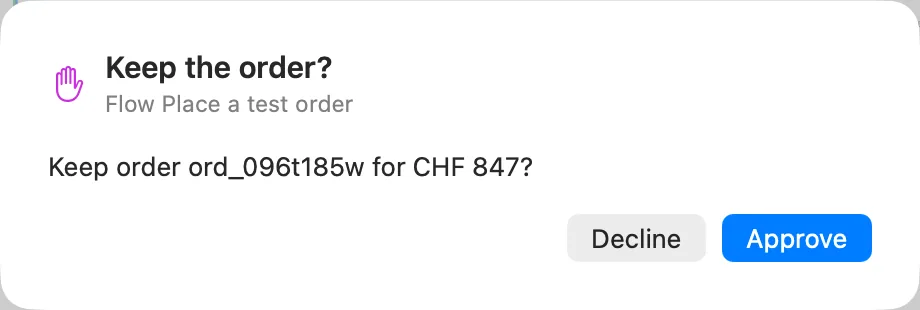
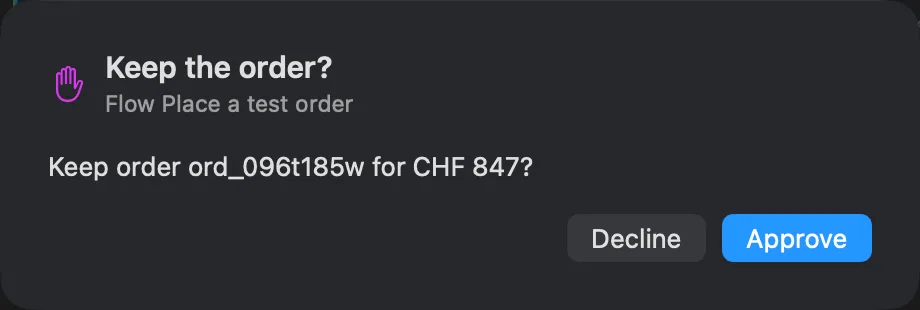
Approving is always the person's to do. When an agent runs a flow and answers an Approve block, Echolot puts the
question to you first. In Place a test order, the Approve block Keep the order? asks
Keep order {{body.id}} for CHF {{body.total.amount}}? with the order the shop just created; Decline sends it on
to Cancel order.
Logic
If
Sends what came in to true or false by a condition.
| Setting | What it does |
|---|---|
| Condition | A JavaScript expression (required), such as value.status == 200. |
| Port | Side | What it carries |
|---|---|---|
value | in | The value to test. |
true, false | out | The same value, out of one of the two. |
Morning stock check uses If Running low? with value.body.items.some(p => p.stock.bern < 5) on the products
the shop returned.
Switch
Sends what came in to the first case whose condition holds, else to default.
| Setting | What it does |
|---|---|
| Cases | A list (required). Each case has a name (its output port) and a condition. |
| Port | Side | What it carries |
|---|---|---|
value | in | The value to test. |
| one per case | out | The value, when that case is the first that holds. |
default | out | The value, when no case holds. |
Evaluate
Runs JavaScript on what came in. The last expression is the result: ({ id: value.body.id }) or a + b. Code
with a return of its own runs as the body of a function, and what return gives is the result. A promise is
awaited. pm.test and pm.expect work as in
scripts, and their results count as the run's tests. console.log lines go to
the run log.
| Setting | What it does |
|---|---|
| Code | The JavaScript (required). |
| Inputs | Input names, separated by commas; each is a variable in the code. value when empty. |
| Port | Side | What it carries |
|---|---|---|
| one per name in Inputs | in | That variable's value. |
result | out | The result. |
fail | out | The error, when the code threw. |
// Inputs: pages. Joins the lists that Collect gathered.
return pages.flat();
Delay
Waits, then passes the value on.
| Setting | What it does |
|---|---|
| Milliseconds | How long to wait (required). A number, or a template such as {{wait}}. |
Ports: value in, value out.
Loops
Repeat
Sends index as many times as Count, counting from 0, then done.
| Setting | What it does |
|---|---|
| Count | How many times (required): 0 to 100,000. A number or a template such as {{pages}}. |
| Port | Side | What it carries |
|---|---|---|
run | in | Starts the loop. |
index | out | 0, 1, 2… once per round. |
done | out | What came into run, after the last round. |
For Each
Sends each item of a list in turn, then done. It has no settings.
| Port | Side | What it carries |
|---|---|---|
list | in | The list. Anything else fails the block. |
item | out | One item per round. |
index | out | The item's position, from 0. |
done | out | The whole list, after the last round. |
Collect
Gathers what arrives during a loop into one list, and sends it when the loop is done. It has no settings.
| Port | Side | What it carries |
|---|---|---|
item | in | One value per round. |
list | out | Everything gathered, once the loop it belongs to ends. |
Each round of a loop finishes before the next starts, and the blocks it reaches run again in each round. Values from outside the loop, such as an input from Start, stay available to every round.
Poll
Sends a saved request again and again until a condition holds (a sign-in approved, a job finished) or the deadline passes.
| Setting | What it does |
|---|---|
| Request | The saved request (required). |
| Variables | Names, separated by commas; each becomes an input that fills that {{variable}}. |
| Until | A condition on response, the last response. Default: response.status >= 200 && response.status < 300. |
| Interval | Seconds between sends. Default 5. A number or a template. |
| Deadline | Seconds before it gives up. Default 300. A number or a template. |
| Port | Side | What it carries |
|---|---|---|
send | in | Starts polling. When an object arrives, its keys become variables. |
| one per name in Variables | in | The value for that variable. |
success | out | The response that met the condition. |
timeout | out | The last response, when the deadline passed. When timeout isn't linked, the block fails instead. |
fail | out | The error, when a send failed. |
Unlike Request, a response outside 2xx doesn't fail Poll: it sends again until Until holds.
Data
Value
A fixed value: text, a number, true or false, a list or an object.
| Setting | What it does |
|---|---|
| Value | Text, a number or JSON (required). |
| Port | Side | What it carries |
|---|---|---|
run | in | Sends the value again each time something arrives. |
value | out | The value. With nothing linked into run, it is sent once at the start. |
Template
Text with {{name}} filled from the object that came in and the run's variables.
| Setting | What it does |
|---|---|
| Text | The text with templates (required). |
Ports: values in (an object), text out.
Select
Picks values out of what came in by a path, one output each.
| Setting | What it does |
|---|---|
| Fields | A list (required). Each field has a name (its output port) and a path, such as $.body.user_code. |
| Port | Side | What it carries |
|---|---|---|
value | in | The value to pick from, often a response. |
| one per field | out | The value at that path, or null when nothing is there. |
all | out | Every field as one object. |
Paths are the common part of JSONPath:
| Path | Picks |
|---|---|
$.body.items[0].sku | A key, then the first item of a list. |
$.body.items[-1] | The last item. |
$.body.items[*].sku | sku of every item, as a list. |
$['content-type'] | A key with characters a dot can't take. |
body.id | Without $, the path starts at the value. |
Set Variable
Saves values as variables, so later blocks and requests read them with {{name}}.
| Setting | What it does |
|---|---|
| Variables | A list (required). Each has a name, a path into what came in (all of it when empty), a scope and secret. |
| Scope | Where the value goes |
|---|---|
run | This run only, and the requests it sends. |
environment | The active environment (the default). The run fails here when no environment is chosen. |
workspace | The workspace's own variables. |
global | Not writable from flows: the run fails and asks you to save to the environment or the workspace. |
With secret on, the value goes to the Keychain, never to a file, and it is hidden in the run log and in what agents
see from the moment it leaves the block before. When path finds nothing, the variable keeps its old value, so a
token response without a new refresh token doesn't wipe the one you have. See secrets.
Ports: value in, value out (what came in, passed on).
Get Variable
Reads a variable as requests see it: the run's own, then the environment's, the workspace's and the global ones.
| Setting | What it does |
|---|---|
| Name | The variable (required). |
| Port | Side | What it carries |
|---|---|---|
run | in | Reads it again each time something arrives. |
value | out | Its value, or null when there is none. With nothing linked into run, it is read once at the start. |
Output
Display
Passes what came in on, unchanged, so you can look at it: select the block after a run and read Last run in the inspector.
| Setting | What it does |
|---|---|
| Format | auto, text, json, table or image. Default auto. |
Ports: value in, value out.
Log
Writes a line to the run log.
| Setting | What it does |
|---|---|
| Message | The line, with templates. {{value}} is what came in; all of it when the message is empty. |
Ports: value in, value out. In Place a test order, Order failed logs Create order answered {{status}}
when the order can't be placed.
Assert
Checks what came in. Each check is a test result of the run, and a failed one makes echolot flow run fail.
| Setting | What it does |
|---|---|
| Checks | A list (required). Each check has a name and a condition on value. |
| Port | Side | What it carries |
|---|---|---|
value | in | The value to check. |
passed | out | The value, when every check holds. |
failed | out | The value, when any check fails. |
value.status === 200   // Answers 200
value.time < 2000      // Within two seconds
Notify
Shows a macOS notification from Echolot. macOS asks for permission the first time. On the command line, the notification is printed instead.
| Setting | What it does |
|---|---|
| Title | The notification's title (required). Templates allowed. |
| Message | Its text. Templates allowed. |
Ports: value in, value out. Morning stock check ends with Notify Restock, titled Restock Bern.
Write File
Writes what came in to a file inside the workspace folder.
| Setting | What it does |
|---|---|
| Path | Relative to the workspace folder, such as exports/items.json (required). Templates allowed. |
| Format | json (formatted), text or csv. Default json. |
| Port | Side | What it carries |
|---|---|---|
value | in | What to write. |
path | out | The file's path, relative to the workspace. |
fail | out | Why it could not be written. |
A file already there is replaced. The workspace's own files are off limits: the requests, flows, environments,
mocks, mcp-servers and specs folders, workspace.toml and hidden files. For CSV, a list of objects becomes
one row per object with a column per key; anything else is written one value per line.
Values between blocks
Values are JSON: text, numbers, true and false, lists, objects or null.
The response object
Request and Poll send a response as an object:
{
  "status": 201,
  "reason": "Created",
  "headers": { "content-type": "application/json", "location": "/v1/orders/ord_9Px3Kd" },
  "body": { "id": "ord_9Px3Kd", "total": { "amount": 449, "currency": "CHF" } },
  "time": 182.4,
  "url": "https://demo.echolot.dev/v1/orders"
}bodyis parsed JSON when the response is JSON, text otherwise, andnullwhen empty.- Header names are lowercase. A header sent more than once is joined with
,. timeis the whole exchange in milliseconds.- A body over 8 MB arrives as
nullwith"truncated": true. The full response is still in history.
Templates
Settings marked "templates allowed" fill {{name}} from what came into the block:
{{status}},{{body.id}}or{{body.items[0].sku}}: a key or a path into the object that came in.{{value}}in Log, Notify and Write File: the whole value that came in.- Variables a Set Variable block saved with scope
run.
A name that matches nothing stays as it is, so a Request block's own {{variables}} still resolve from the
environment when it sends. Objects and lists are written as JSON text.
Conditions
If, Switch, Poll and Assert take a JavaScript expression that is true or false. value is what came in; Poll's
Until reads it as response, which works everywhere too.
value.status == 200
response.status === 200 && !!(response.body && response.body.access_token)
value.body.items.length > 0
An expression that throws fails the block (in Assert, it fails that check).
Limits
So a wrong link can't run forever, a run stops after 10,000 block runs or one hour. Runs that webhooks start stop after two minutes.
Flows
Chain your saved requests, MCP servers and Echolot's tools into small programs on a canvas, and run them by hand, on a schedule, from a webhook or as a tool for agents.
Running and triggers
Run a flow by hand, on a schedule, from a webhook, as a tool for AI agents or from the command line, and allow the triggers that start flows without you.