 Echolot
Spec from Responses
Write an OpenAPI spec from the requests you've sent and the responses they got.
You often have requests before you have a spec: a collection someone imported, or calls you tried while exploring an API. Spec from Responses turns them into an OpenAPI document. Each request becomes an operation, documented from the last response it got: its path and parameters, the body it sent, and the response with a JSON Schema of its body and an example. Add to a spec you already have, and it only gains what it lacks.
Documenting a folder
Send the requests you want documented, so each has a response. In Alpenglow, send the requests in the Catalog folder, for example.
Right-click the folder in the Requests sidebar and choose Document in OpenAPI Spec…. To document the whole workspace, choose + › New Spec from Responses… in the Specs sidebar, From Responses… on an empty Specs page, or New Spec from Responses… in the command palette.
In the Document in OpenAPI Spec sheet, check the choices:
| Choice | What it means |
|---|---|
| Requests | Whole workspace, or one folder. Requests in its subfolders are included. |
| Spec | New Spec, or a spec in the workspace to add to. A folder that already follows a spec adds to that one. |
| Title | The title of a new spec. It starts as the folder's name, or the workspace's. |
| Link “folder” to the spec | On by default. The folder's requests then follow the operations they became, so later changes to the spec can be applied to them. |
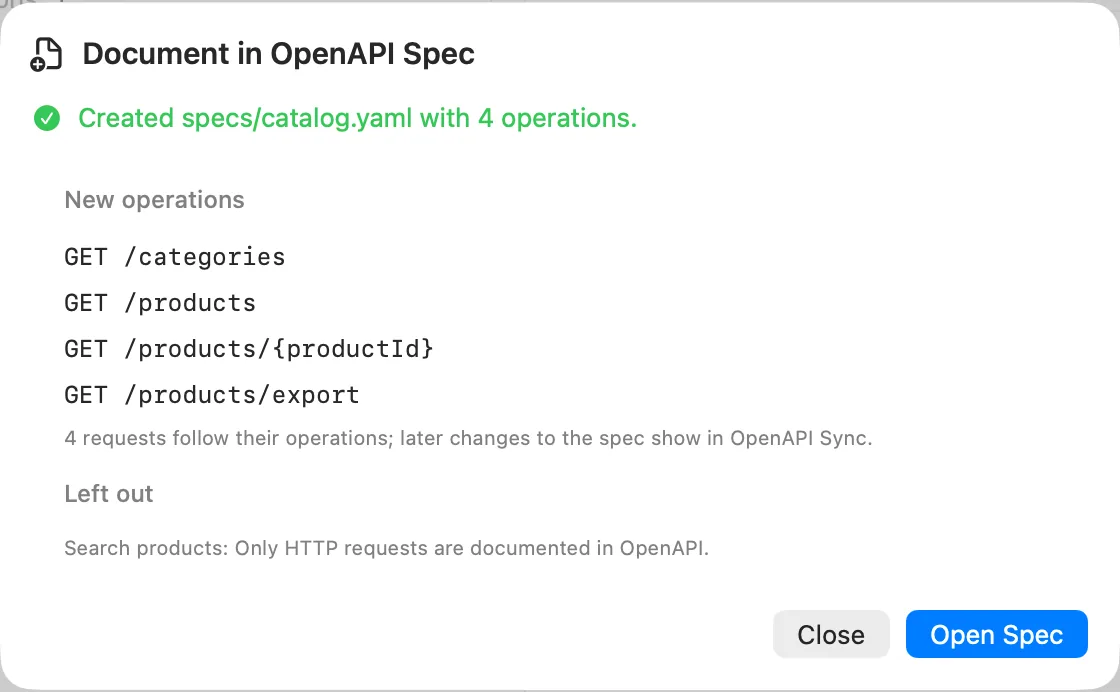
Click Document. The sheet says what happened, then Open Spec opens the result.
What you get
The result lists:
| Heading | Meaning |
|---|---|
| New operations | Operations the spec didn't have, such as GET /products/{sku}. |
| Gained a response | Operations it had that now document another response, such as a 404. |
| Documented already | Operations it already documented as they were answered. Nothing changed. |
| Left out | Requests that weren't documented, each with the reason. |
It also says how many requests now follow their operations, and how many errors lint finds in the result, if any.
What goes into each operation:
- The path, in OpenAPI form: path segments that came from variables become path parameters, documented with the values sent. The server part of the URL is left out of the path.
- Query parameters and headers the request sets.
- The request body and the response, with a JSON Schema made from the body and an example. Large examples are left out and the schema stays; long arrays keep a few items in the example.
- The request's name as the operation's summary, and its subfolder as the operation's tag.
- The request's auth as a security scheme. Where OpenAPI has no scheme for it (OAuth 2 with the device code grant), a note says so.
Secrets are masked: secret variables and values under keys that look secret (tokens, passwords, keys) appear as
•••••• in examples.
Adding to a spec you have
Choose the spec under Spec. Echolot adds only what is missing: operations, responses, schemas and security schemes it doesn't name yet. What the spec says already stays as written. Specs in Swagger 2.0 can't be added to; only OpenAPI 3 documents can.
Documenting single responses from History
In History, right-click an HTTP exchange that got a response and choose Add to OpenAPI Spec…. The same sheet opens, for that one response. This is handy for a response you saw once, such as an error.
What is left out
- Requests that aren't HTTP (GraphQL, gRPC, WebSocket and the rest): only HTTP requests are documented in OpenAPI.
- Requests with no response yet: send them first.
- Requests whose send failed before any response.
- Requests in a subfolder that follows a spec of its own.
Keep it current
Once the folder follows the spec, the spec is the contract. Edit it on the Specs page, and apply its changes to the requests with Check “folder” for Changes…. See Requests that follow the spec. You can also give the spec's responses to a mock, so front ends can work against it.
Agents can do the same through the add_to_spec tool, when the Specs toolset is on: see Agents.