 Echolot
Mocks
Local mock servers made of routes you write by hand, with fake data, or of an OpenAPI spec; choose what they answer, check requests and share them on the network.
A mock is a server on a port of your Mac that answers like an API. Front ends, apps and tests can use it before the API exists, or while the real one is down. A mock answers from two sources, alone or together:
- Routes you make by hand: a method, a path, and the JSON, XML or text it answers. Bodies can hold fake data
(
{{$randomFullName}},{{$randomEmail}}) that changes on every request, and parts of the request ({{request.params.id}}). No spec needed. See routes and fake data. - An OpenAPI spec: every operation answers with the responses the spec documents, its examples or a body made
from its schemas. Requests that break the spec get a
400that says why, so the mock also tells you when a client sends the wrong thing.
For answers that need code or state, a mock can also have routes in JavaScript.
Open the page with Mocks in the sidebar's module switcher, or ⌘4.
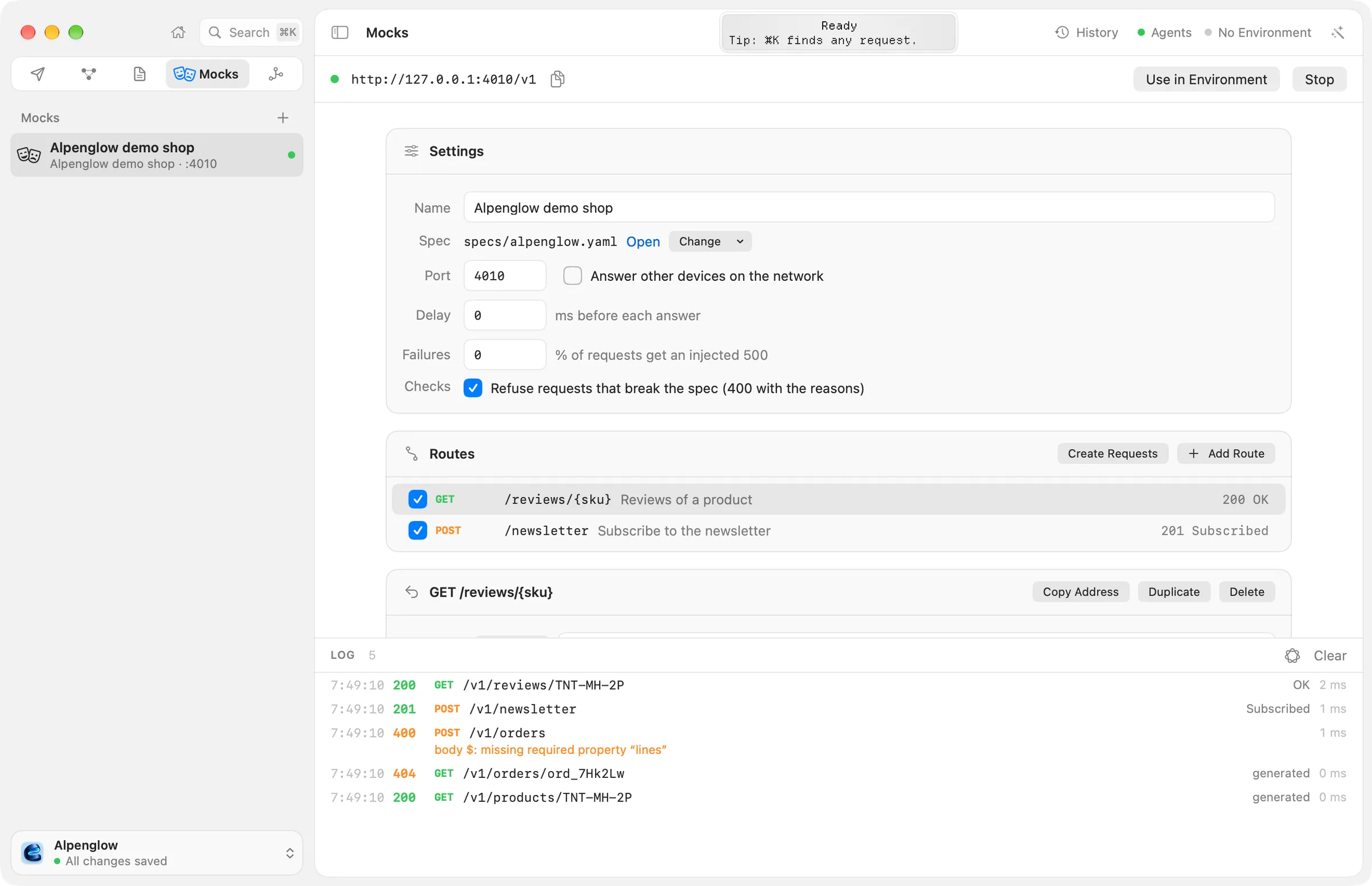
Creating a mock
Click + in the sidebar's Mocks header, or use the buttons on the empty page:
- New Mock makes a mock of routes. It starts with one route,
GET /users, that answers five fake users, so you can start it and see what a body can do. Change it or add your own; see routes and fake data. - Mock of a spec (in the + menu, or Mock of a Spec on the empty page) makes a mock of a spec in the workspace, such as Mock of Alpenglow demo shop.
The new mock takes the next free port from 4010. Its settings and routes are a file in the workspace's mocks
folder, so a team shares its mocks through Git.
A mock of routes can serve a spec too, and a mock of a spec can have routes: Serve a Spec in the Settings card adds one, Change › Stop Serving the Spec takes it away.
Starting and stopping
Click Start (⌘R). The bar at the top shows the mock's address, such as
http://127.0.0.1:4010. When the mock serves a spec whose server URL has a path (https://demo.echolot.dev/v1), the
address ends with it (http://127.0.0.1:4010/v1) and the mock answers under it; requests may leave that path out, too.
The copy button next to the address copies it.
Try it from Terminal:
curl http://127.0.0.1:4010/usersStop stops it. The sidebar shows which mocks run: a green dot, and the port beside the spec's title or the number
of routes (Alpenglow demo shop · :4010, 3 routes · stopped). Right-click a mock for Start or Stop and
Delete…. Delete asks first; the settings file goes to the Trash and the spec stays.
Mocks run while their workspace window is open. A running mock picks up changes to its routes, spec and settings without stopping. A port another program uses can't be taken: Echolot says so; choose another port.
Sending requests to the mock
- Create Requests in the Routes card makes a folder of requests that call the mock's routes, with
{{baseUrl}}set to the mock's address. See requests from routes. - Use in Environment (while the mock runs) makes an environment named
Mock: <name>whose{{baseUrl}}is the mock's address, and makes it active. Requests that start with{{baseUrl}}, such as the ones Generate Requests makes from a spec, then go to the mock until you choose another environment. See Environments.
Settings
| Setting | What it does |
|---|---|
| Name | The mock's name in the sidebar. |
| Spec | The spec it serves, or None: only its routes answer. Open opens the spec on the Specs page; Serve a Spec and Change choose one or stop serving it. |
| Port | The port it listens on, from 1 to 65535. |
| Answer other devices on the network | Listens on every network interface, for testing from a phone or a container. Off: only this Mac reaches it. |
| Delay | Milliseconds to wait before each answer, up to 60,000, to try a slow API. |
| Failures | The percentage of requests that get an injected 500, to try how a client copes. |
| Checks | With a spec: Refuse requests that break the spec (400 with the reasons). On by default. |
Which response a request gets
A request goes to the first of these that has an answer for its method and path:
- The mock's routes in JavaScript. A route that sets nothing passes the request on.
- Its routes made by hand. A route can have several responses; a request can ask for one by name or status, rules on the request choose others, and otherwise the route's default answers.
- The spec's operations, as below.
Literal path segments win over parameters, so /pets/mine is chosen before /pets/{id}, in routes and operations
alike.
For an operation of the spec, the mock picks the response in this order:
- What the request asks for: a
Prefer: code=404, example=emptyheader, or Postman'sx-mock-response-codeandx-mock-response-nameheaders. - The response chosen for the operation in the Spec Responses card.
- The operation's first success response.
The Spec Responses card lists every operation with a menu: First success, or one of the documented statuses, and for a status with several examples, the example. The choice is saved with the mock.
The body is the response's named example (the one asked for, or the first), its single example, or else a body
made from its schema: fake data that fits each field's type, format and name (an email address for a field of format
email), within the schema's limits, made again on every request. A field named like a path parameter repeats it.
When the spec documents several media types, the request's Accept header picks one. The documented headers and
content type are sent too. A 204, a 304 and answers to HEAD have no body.
Other answers the mock gives:
| Status | When |
|---|---|
400 | The mock serves a spec, checks are on and the request breaks it: a missing or mistyped path, query, header or cookie parameter, the wrong content type, or a body that doesn't match its JSON Schema. The body lists every reason. |
404 | No route and no operation has the path. |
405 | The path exists, but not with this method. The Allow header lists the methods it takes, from routes and spec together. |
413 | The request body is larger than 32 MB. |
500 | An injected failure (see Failures). |
501 | The operation documents no response for the status asked for. |
Browsers may call the mock from a page on another port: it answers preflight requests and sends the CORS headers.
The log
The bottom of the page lists the requests the selected mock answered, newest first: the time, the status, the method
and path, the response used (a route's response name, a spec example's name, or generated when the body came from
the schema), and how long it took. Problems are on the lines below a request: where it broke the spec, or a fake value
a route's body couldn't make. Rest the pointer on a request to see the response body, the request's body and content
type; Copy Response copies the body. Clear empties the log.
Where Apple's on-device model is available, the button beside Clear summarizes the log.
Saving examples into the spec
For a spec's operations, the spec is the only source of what the mock answers, so a real response you got is saved
there as an example: in History, right-click an exchange of a request that follows the spec
and choose Save as Mock Example…. Give it a name, such as two tents, and click Save.
The response becomes a named example of its operation's response in the spec the request follows. Choose it in the
Spec Responses card, or ask for it with Prefer: example=two tents.
For a path the spec doesn't have, or a mock without a spec, make a route and paste the body.
Sharing on the network
Turn on Answer other devices on the network to reach the mock from a phone, a tablet or a container. Other devices use your Mac's address on the local network, with the mock's port.
The first time, macOS may ask whether Echolot may find and connect to devices on your local network. Allow it, or other devices can't reach the mock. You can change the answer later in System Settings › Privacy & Security › Local Network.
Anyone on the network can then call the mock. Turn sharing off when you don't need it.
From the command line
echolot mock alpenglow.yaml serves a spec file, and echolot mock -w <workspace> <mock> serves a mock of a workspace
with its settings and routes, spec or not, for CI or a container. See echolot mock.
echolot fake makes fake data from the same templates, for fixtures and seed data.
Agents can start mocks and read their logs through Echolot's MCP server, and, when the Mocks toolset is on, create mocks, add and change routes, generate fake data and make requests from routes. See Agents.
.proto files
Keep a gRPC service's .proto files in the workspace, edit them with a live outline, and make requests from their methods.
Routes and fake data
Make a mock's routes by hand, with JSON, XML or text responses, fake data that changes on every request, rules that choose a response, and requests made from the routes.