 Echolot
Tools and quality
See what a server's tools cost a model on every turn, what a model would stumble over, and which tool it would pick.
A model never sees an MCP server. It sees the server's tool list, sent with every turn of a conversation and turned into each provider's own format. The How a model sees this server card on the MCP Servers page shows that list as a model gets it: what it costs, which tools cost the most, and the names, descriptions and schemas a model would get wrong. Use it while you build a server, or before you hand someone else's server to an agent.
The card appears under Tools once a check has listed at least one tool.
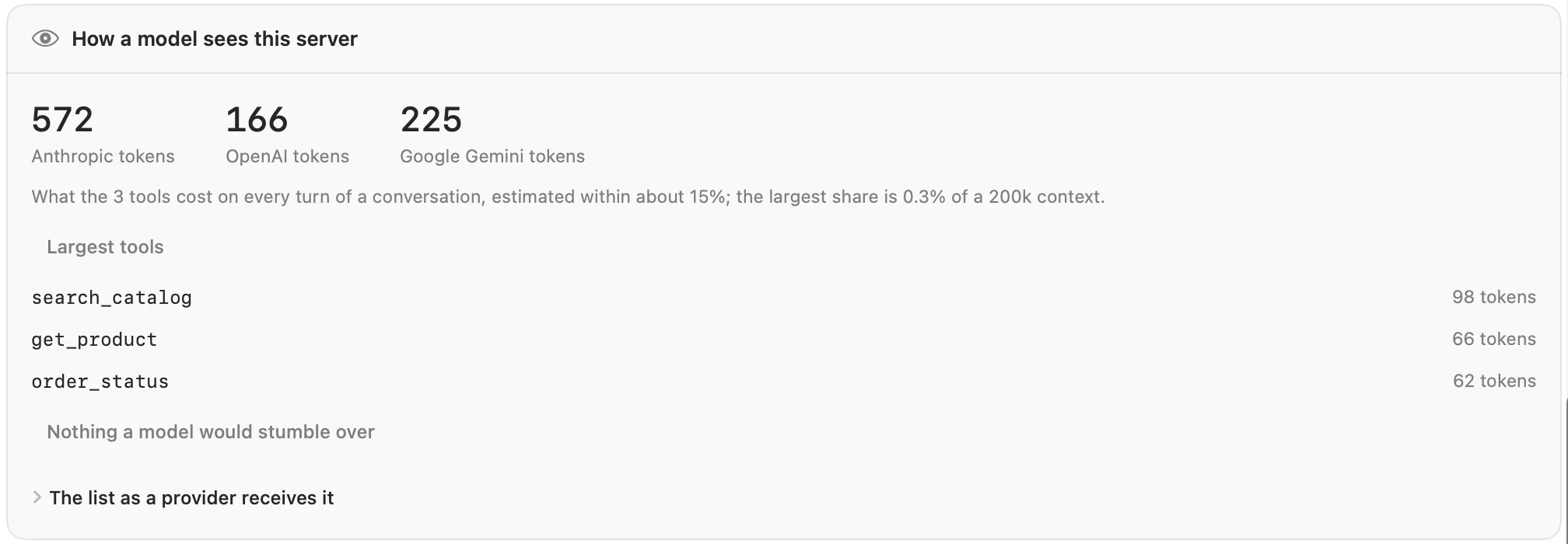
What the tools cost
The top of the card gives the tokens the tool list takes with Anthropic, OpenAI and Google Gemini, on every turn, counted in each provider's format. Below it, a line says how many tools that is and what share of a 200k context the largest of the three takes.
The counts are estimates, within about 15% of what the providers count. They're good for comparing servers, and for seeing what a change to a description or schema does.
Largest tools lists the five tools that cost the most, with their tokens. A server with one tool skips this list.
What a model would stumble over
Next comes the list of findings, worst first. The heading counts them (for example 1 problem, 2 warnings), or reads
Nothing a model would stumble over. Each finding names the tool, says what is wrong and suggests a fix.
| Kind | Meaning |
|---|---|
| Problem | A provider refuses the tool, or a model can only guess how to use it. Fix these first. |
| Warning | It works, but a model is likely to pick the wrong tool or fill in the arguments badly. |
| Note | Worth knowing, such as a constraint one provider drops. |
What Echolot checks in each tool:
| Finding | Kind | What to do |
|---|---|---|
| The name is not one a provider accepts | Problem | Use letters, digits, _ and -, up to 64 characters. Anthropic and OpenAI refuse the rest. |
| No description | Problem | Say what the tool does, what it needs and what it returns. |
| The description says little more than the name | Warning | Say what the tool needs and returns, and when to use it rather than a similar tool. |
| A long description (over 1,500 characters) | Note | It's read again on every turn. |
| The input schema is not an object | Problem | Every provider wants {"type": "object", "properties": …}. A tool without parameters says "properties": {}. |
| The schema has no properties | Note | Say "properties": {} for no parameters, or describe the ones there are. |
| Takes any object | Warning | Describe the properties the tool reads, so the model doesn't invent arguments. |
| Requires a parameter the properties don't define | Problem | Define the property, or take it out of required. |
| Parameters without a type | Problem | Give each a type (or an enum). A model guesses otherwise, and OpenAI's strict mode refuses it. |
| Free-form objects (no properties) | Warning | Describe the keys, or say in the description what goes in. |
| Parameters without a description | Warning | One line each: what it is and an example value. |
Uses $ref | Warning | Gemini drops it, so the parameter accepts anything there; OpenAI's strict mode needs it inlined. |
Keywords Gemini drops, such as oneOf, pattern or additionalProperties | Note | The constraint is lost with Gemini. |
| A big schema (over about 1,000 tokens) | Warning | Split the tool, or move rarely used options out of the schema. |
| More than 25 parameters | Warning | Split the tool, or group the options. |
| Nested more than 5 levels deep | Warning | Flatten the arguments; models fill deep structures badly. |
| An enum with more than 40 values | Note | Every value is read on every turn. |
And in the list as a whole:
| Finding | Kind | What to do |
|---|---|---|
Names a model would confuse (the same once case, _ and - are ignored) | Problem | Name the tools after what sets them apart. |
| Two tools with the same description | Problem | Say what sets them apart; a model picks between tools by their descriptions. |
| Two descriptions that say much the same thing (60% of their words or more in common) | Warning | Say in each when to use it rather than the other. |
| More than 128 tools | Problem | OpenAI refuses more than 128. Offer fewer, or split the server. |
| More than 40 tools | Warning | A model picks worse among many. Offer fewer at a time, or split the server by topic. |
| The list costs more than 20,000 tokens a turn | Warning | Shorten descriptions and schemas, or offer fewer tools. |
After you change the server, click Check again: the card follows the new tool list.
The list as a provider receives it
Open The list as a provider receives it at the bottom of the card, and choose Anthropic, OpenAI or Google Gemini. You see the tool list as that provider's API gets it, as JSON. Copy copies it. This is where you see, for example, what Gemini's format leaves out of a schema.
Try with a model
The Try with a model card below asks a real model which tool it would call. Type what someone might ask an agent
to do with this server, such as Is the two-person tent in stock?, and click Try.
The model sees the server's tools and answers with the calls it would make. Nothing is called. For each call you see the tool and its arguments; arguments that don't fit the tool's schema are marked, with what's wrong. That is how unclear names and descriptions show themselves. Below, Echolot shows the tokens used and, for models it knows the price of, about what the turn cost.
The card uses the model chosen in Settings › Assistant. Without one, it says to choose a model provider there. The first time you try, Echolot asks whether it may send the prompt and the server's tools to that provider; on-device models and servers on your Mac don't ask.
From the command line
echolot mcp check --quality prints the same report in a terminal, and --strict makes it fail with exit code 1 when
there is a problem, so a server's CI can keep its tool list in shape. --as anthropic, --as openai or --as gemini
prints only the list as that provider receives it. See echolot mcp.
echolot mcp check --url https://demo.echolot.dev/mcp --quality